
Joined the nowfold waitlist? Your launch email will include a code for a discounted first year of nowfold Premium Annual. It’s a thank-you for being here early.
You’ll redeem it through Apple on your iPhone. The short version: copy the code from your email, open Have a code? in nowfold, then check the offer before confirming with Apple.
What the waitlist offer includes
The offer gives you one year of Premium at a reduced price. In the French App Store, that means €9.99 for the first year, then renewal at the standard annual price, currently €24.99 per year. That’s about 60% off the first year in France.
If your Apple account is eligible for the introductory trial, you’ll get 3 days free first, followed by the discounted year. The trial is available once per subscription group; using a code doesn’t reset trial eligibility.
The offer applies to Annual. Monthly and One-time have their own prices. Prices and savings vary by App Store country or region, so use the local price and dates Apple shows before you confirm.
1. Find the code in your launch email
Open the nowfold launch email on your iPhone and copy the code without adding spaces. Use the App Store link in that email to install or update nowfold.
Keep the email handy. If it includes a redemption link, you can use that to open the offer directly with Apple, then follow the price checks below and return to nowfold afterward.
Your purchase belongs to the Apple account used for App Store purchases. Its email address doesn’t need to match the one you used for the waitlist, and you don’t need to create a nowfold account.
2. Open “Have a code?” in nowfold
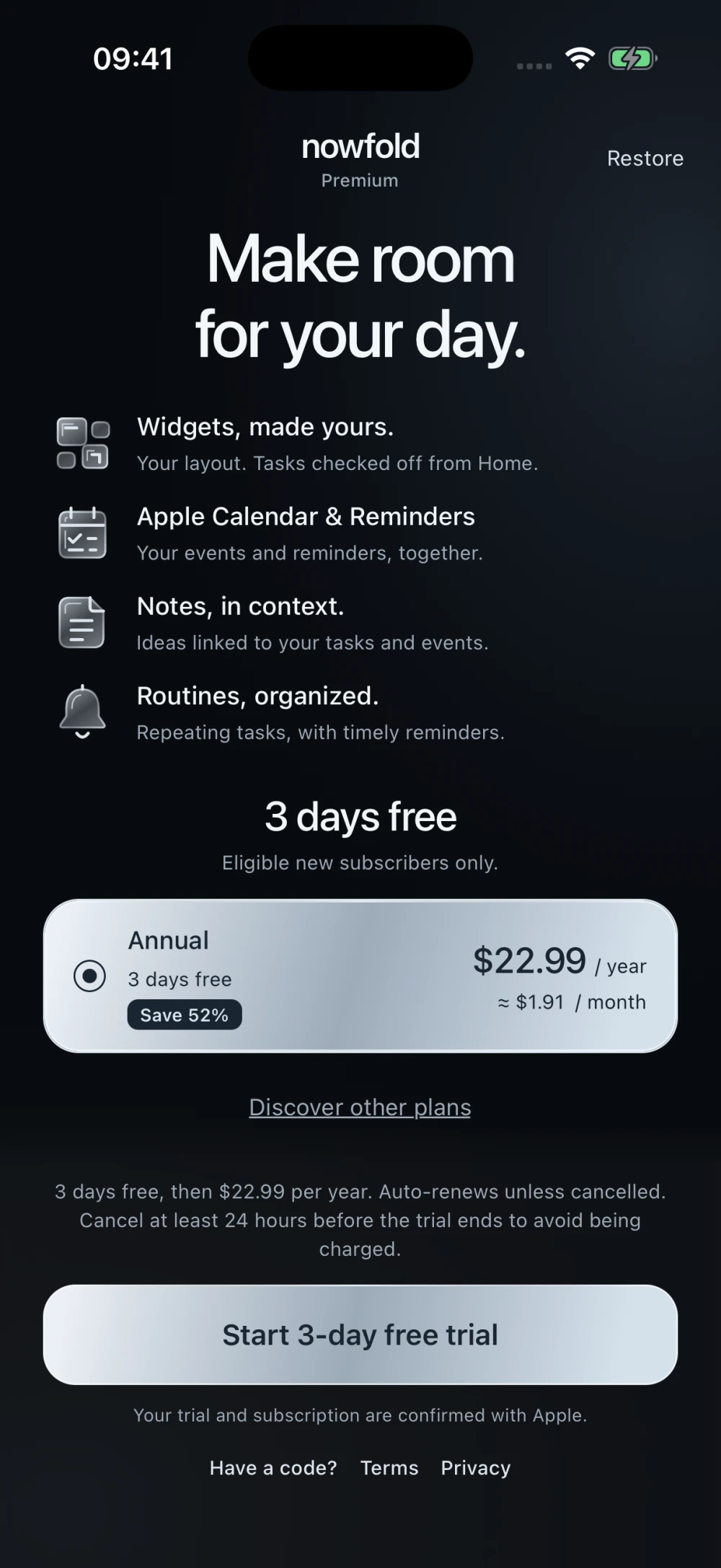
On your first visit, follow nowfold’s welcome screens until you reach Premium. Tap Have a code? below the main subscription button, next to Terms and Privacy. On a smaller screen or with larger text, you may need to scroll to reach it.
Use this link before starting a subscription with the main button. The Annual card shows the regular price; entering your code opens a separate Apple offer flow.
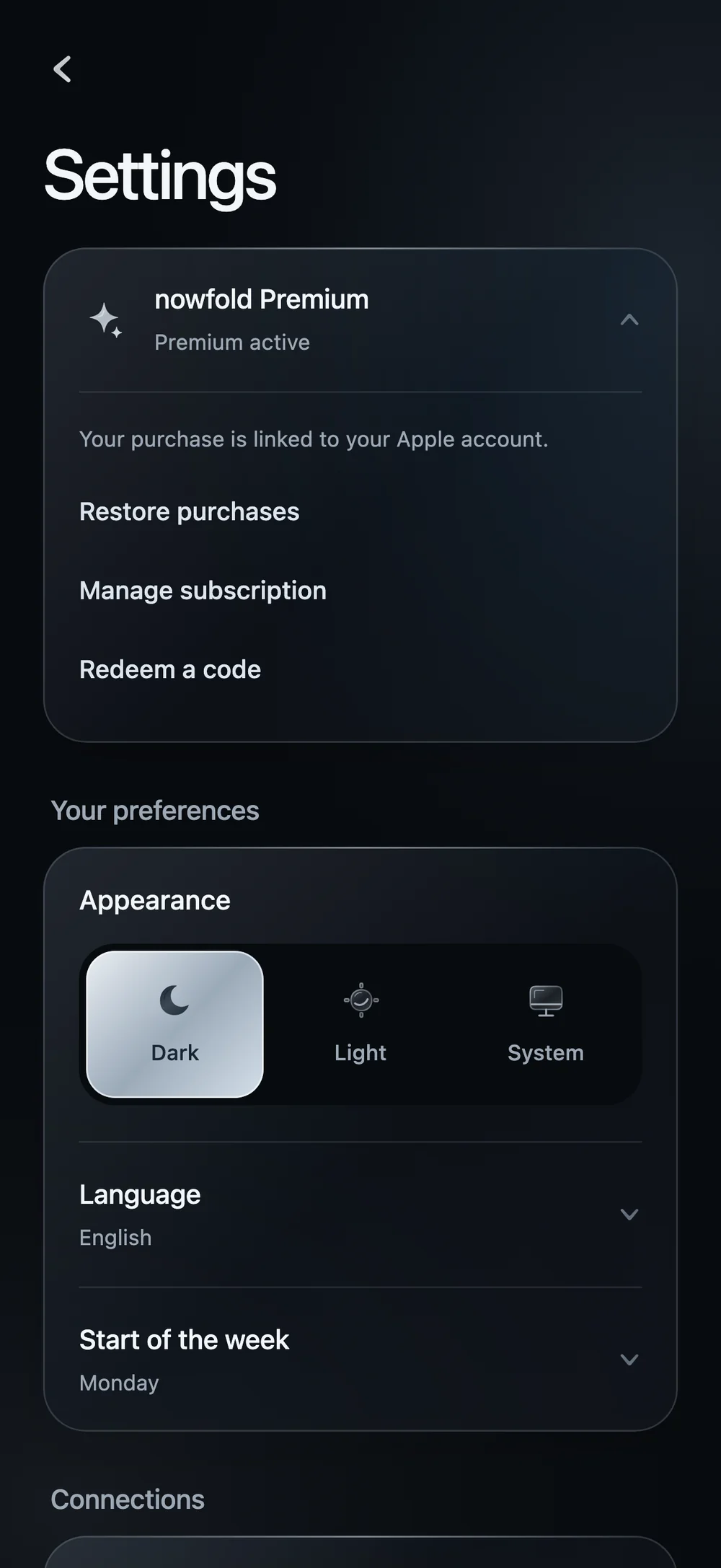
Already using nowfold with an active subscription? Open Settings from the top of Today, tap nowfold Premium to expand its actions, then choose Redeem a code.
3. Enter the code and check Apple’s offer
Paste the code into Apple’s redemption window and follow its prompts. Before you confirm, check:
- The plan: nowfold Premium Annual.
- The offer price: the discounted year in your local currency.
- The dates: any eligible free trial, the first payment and the renewal.
- The renewal price: the standard annual price after the discounted year.
For a new, trial-eligible subscriber in France, the configured offer is 3 days free → €9.99 for one year → standard annual renewal, currently €24.99. Without trial eligibility, there is no free-trial period.
If you already have a subscription, Apple determines when the offer takes effect. Check the date shown rather than assuming the discount changes a payment you’ve already made.
If the expected offer isn’t shown, close the confirmation and check the code before proceeding. Apple handles redemption and billing; you can read more about how Apple offer codes work.
4. Return to nowfold
After confirming with Apple, return to nowfold and allow a moment for Premium to update. When Premium is active appears, tap Open nowfold to continue.
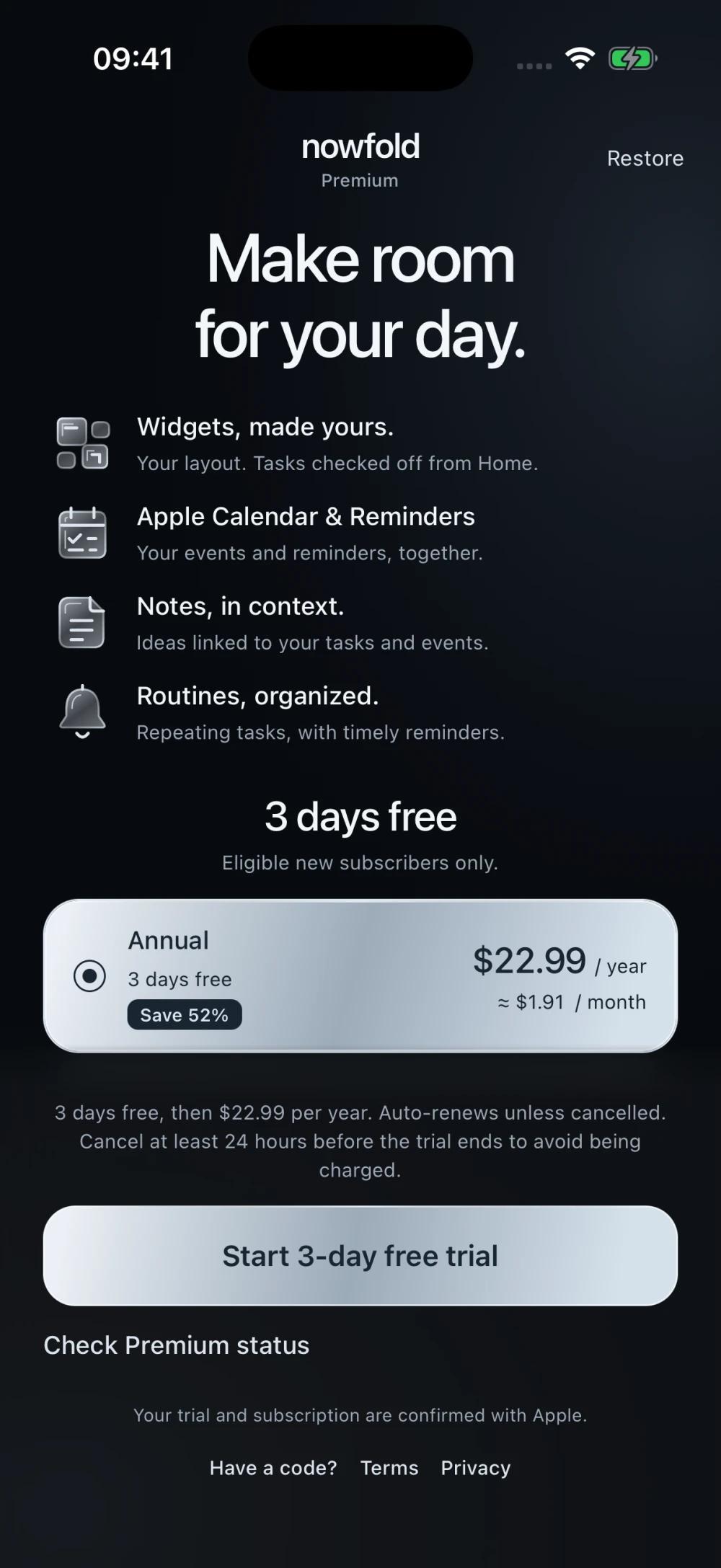
If you’re still on the Premium screen, tap Check Premium status when it’s available. If you redeemed through a link outside the app, or you’re using a new installation, tap Restore at the top right with the same Apple account. From Settings, this action is called Restore purchases.
You don’t need to buy another subscription to restore an existing purchase. Once you’re in, you can build your first custom widget.
If something doesn’t work
The code is invalid or unavailable
Copy it again from the launch email and check for spaces. The offer may also be unavailable if the campaign has ended, its redemption limit has been reached, or your Apple account has already used this offer. Each customer can redeem the same offer once.
Apple’s redemption window doesn’t open
Open the App Store first and complete any account or terms prompts, then try Have a code? again. If your launch email includes a redemption link, try that on your iPhone. This is a known limitation of Apple’s in-app redemption window.
The price is still the regular price
The price on nowfold’s Annual card is the standard subscription price. Check the separate Apple offer confirmation after entering your code. If that confirmation also shows the wrong price, stop there and contact us with the message you see and your App Store country or region.
Premium hasn’t unlocked
Reopen nowfold and tap Restore at the top right of Premium, or Restore purchases in Settings. Make sure you’re using the Apple account that redeemed the offer. If it still doesn’t update, get in touch so we can help.
Manage your subscription afterward
Your subscription renews automatically after the discounted year unless you cancel. In nowfold, open Settings → nowfold Premium → Manage subscription, or on your iPhone go to Settings → your name → Subscriptions → nowfold.
To avoid a charge after a free trial, Apple advises cancelling at least 24 hours before it ends. You’ll find the dates in your subscription settings. Apple’s subscription cancellation guide explains the steps.